Finding the right impact screen for golf simulators hinges on durability, image clarity, and install flexibility. This article highlights five top options that balance sturdiness, projection quality, and ease of setup. Ideal for dedicated home golfers, garage setups, or small training studios, these screens cater to a range of space and budget needs. Below, you’ll see concise comparisons and a buying guide to help you choose the best fit for your practice goals and room constraints.
Summary of Selected Products
- Aikeec Golf Simulator Impact Screen – 10 ft × 10 ft (7mm thickened) – ultra-durable with multiple grommets
- Aikeec Golf Simulator Impact Screen – 10 ft × 8.5 ft – crystal-clear, versatile for indoor/outdoor
- GoSports Golf Simulator Impact Screen – size options, compatible with GoSports nets
- IDEATRY Golf Simulator Impact Screen Enclosure – 270° protection with target and net
- Joogto Golf Simulator Impact Screen – 4mm thicker screen with self-restoration and gloss control
Aikeec Golf Simulator Impact Screen – 10ft by 10ft

The Aikeec 10×10 impact screen emphasizes durability with a thickened polyester structure designed to resist wear. It’s tested to withstand ball speeds up to 200 mph and claims over 100,000 hits. The dense weave helps resist staining, supporting long-term daily use in indoor or outdoor setups. Best for serious hitters who value longevity and minimal maintenance in busy practice spaces.
Best for: home garages or dedicated practice rooms where high-volume hits are common. This model is chosen for its reinforced edge and robust grommet system, enabling secure, flexible installation with bungee cords or carabiners.
Limitation: claims of performance at high speed require appropriate mounting tension to maintain screen flatness and prevent sag over time.
Key benefits at a glance
- 7mm thickened hitting screen for added durability
- 40-54 perimeter grommets for versatile installation
- Stain-resistant surface for easier maintenance
Aikeec Golf Simulator Impact Screen – 10 ft × 8.5 ft

This screen uses premium Flannel for durability and offers a crystal-clear projection surface. The high-definition surface helps golfers see swing details clearly, supporting improved accuracy during home practice. It’s marketed as versatile for use with any golf simulator system, making it a flexible option for mixed setups.
Best for: players who want crisp visuals and broad compatibility across simulator platforms. Suitable for homes with multiple projector configurations or when upgrading to higher-definition displays.
Limitation: some users may need to adjust framing or mounting to ensure edge tension remains consistent for the projectors used.
Aikeec Golf Simulator Impact Screen – 10 ft × 8.5 ft (7mm thickened, edge reinforcement)
This model combines a 7mm thick polyester with a reinforced 7mm edge and a broad grommet range (32–46). It emphasizes stability and quieter impacts compared to lighter screens, which helps maintain a peaceful home practice environment. It is well suited for indoor use where space is limited and noise levels matter.
Best for: indoor-home gyms seeking a quiet, stable practice screen with reliable edge support. Choose this if you value reduced noise and stable tension in compact setups.
Limitation: thickness and edge reinforcement can add weight, potentially requiring sturdy mounting hardware for tall ceilings or high-tension installations.
GoSports Golf Simulator Impact Screen – Size Options

This projector-facing screen is designed to back a GoSports ELITE Golf Net setup, with high-density woven polyester for durability. It includes corner grommets for simple hanging or corner mounting. The design supports real golf balls and aims to provide a stable backdrop for accurate video capture and projection alignment.
Best for: GoSports ecosystem users who want a complementary screen that fits easily into existing nets and projectors. It’s a practical upgrade for clean, simple installations.
Limitation: does not include projector; must be paired with compatible projector and frame net for full simulator use.
IDEATRY Golf Simulator Enclosure With Net & Target
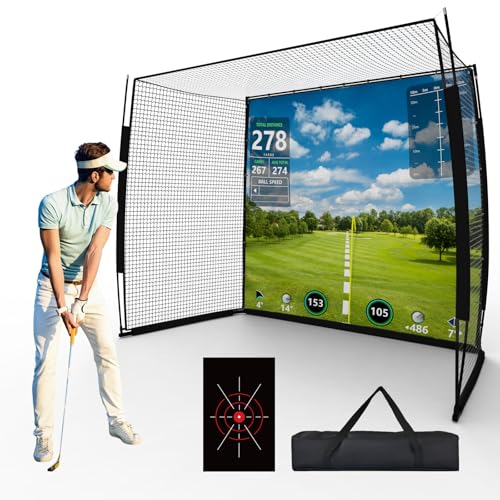
The IDEATRY setup is an enclosure system featuring a 270° protective wrap, an HD impact screen, a precision target sheet, and a practice net. It emphasizes full coverage to reduce bounce-back and protect surroundings. The system is described as stable for garage, basement, or indoor spaces where weatherproofing and space efficiency matter.
Best for: users seeking a complete enclosure with integrated protection, suitable for multi-purpose indoor/outdoor setups. The all-in-one concept can streamline installation and provide strong rebound control.
Limitation: projectors are not included, so you must source your own display options and mounting strategies.
Joogto Golf Simulator Impact Screen – 4mm Thick, 28–32 Grommets

Joogto’s screen uses a natural polyester composite with a smooth resin-coated surface for good light transmission and reduced deformation. It features a higher-grommet design (28–32) and a 4mm thickness, combining lighter weight with solid performance. It’s engineered to minimize glare and color wash for better projection clarity.
Best for: buyers prioritizing glare reduction and a strong, lightweight screen that still handles regular practice well. It’s a practical choice for compact spaces and setups with limited mounting options.
Limitation: thinner construction may offer less durability than thicker screens under heavy, repeated use or with very high-velocity impacts.
Buying Guide: Choosing the Right Golf Simulator Impact Screen
What should you consider when selecting an impact screen?
- Screen thickness and edge reinforcement: Thicker screens and reinforced edges offer longer life and better tension. If you have a busy practice space, prioritize higher durability.
- Grommet count and mounting options: More grommets provide installation flexibility but may require careful alignment. Ensure your mounting hardware supports the chosen screen.
- Projection quality and material: A high-definition surface enhances swing feedback on camera or projector. Look for durable, low-glare surfaces for consistent images.
- Space and enclosure needs: If you want a full enclosure, choose a model with nets and padding. For open-back screens, consider size to fit your projector coverage.
- Noise and vibration: Some screens incorporate dampening features to reduce sound and echo during hard swings, improving the home-practice experience.
- Compatibility: Ensure the screen works with your existing projector, hitting net, or simulator system. Some screens advertise universal compatibility, others are tailored to specific brands.
Practical decision questions
- Do you need an enclosure or a standalone screen? If you want full space coverage, IDEATRY or ZivPlay-type enclosures may be preferable.
- Is noise control important in your space? Look for screens with damping layers or reinforced edges to minimize bounce impact noise.
- How much space can you dedicate to mounting and setup? Larger screens require more wall or ceiling clearance and robust mounting.
- What is your projector setup? Ensure the screen is compatible with your projection method and distance to screen.
Frequently Asked Questions
- Q: Are these screens compatible with all golf simulators? A: Most listed screens are designed to be compatible with a range of simulator systems, but always verify with your projector and net configuration.
- Q: Can I use these screens outdoors? A: Some models are described for indoor/outdoor use, but check material and weather resistance before leaving them outside.
- Q: How do I know which size to choose? A: Size should align with your projector throw distance and room dimensions, ensuring full coverage of the projected image.
- Q: Do these include mounting hardware? A: Many listings specify grommets and general mounting compatibility; confirm if your preferred hardware is included.
- Q: What is the typical life expectancy of an impact screen? A: Durability varies by material and usage; thicker, reinforced screens are designed for higher-volume practice and longer life.
- Q: What about glare and image clarity? A: Look for high-definition, low-glare surfaces to maintain image fidelity during practice.