Looking to recreate a full golf simulator setup at home? This guide highlights five top gear picks that optimize space, safety, and realism for indoor use. Each option is best suited for different buyers — from compact rooms to dedicated garage gyms. If you want a bundled enclosure with nets, a complete launch monitor package, or a high-durability impact screen, you’ll find clear, buyer-focused guidance below.
The following quick reference table helps compare the chosen products at a glance. Use it to identify which setup aligns with your space and budget before diving into full details.
| Product | Best For | Key Benefit |
|---|---|---|
| Golf Simulator Enclosure for Home 10×8 ft Cage (ZivPlay) | Compact home bays | Sturdy steel frame with padded edges and side nets |
| KIKILIVE 10x8FT Golf Enclosure | Budget-friendly, easy setup | Tool-free assembly with comprehensive included kit |
| SkyTrak ST MAX Studio Package | All-in-one launch monitor setup | Integrated launch monitor and enclosure |
| ZEALFEEL 9x7ft Golf Simulator Screen | Durable, high-coverage screen | Double-layer design withstands high-speed swings |
| GYMMALL 10×8 FT Practice Net with Screen | Flexible training modes | 3-in-1 system with projection screen and target cloth |
Golf Simulator Enclosure for Home 10×8 ft Cage

Best for dedicated indoor bays in homes with limited space. This enclosure measures 10 ft 7 in wide by 8 ft tall by 5 ft deep, optimized for projector alignment and simulator accuracy, with a 4:3 impact screen. Note that the simulator, hitting mat, and projector are not included. It includes two side shank nets and corner padding to reduce bounce and protect walls, equipment, and bystanders during high-speed shots.
Who it’s for: homeowners seeking a complete enclosure system with added safety nets and padding. Why chosen: strong frame construction and padding address rebound control and wall protection in compact spaces. Limitation: you must supply your own projector, hitting mat, and launch monitor.
Buyers should consider room width and ceiling height to ensure the 10+ ft width fits comfortably. The dual shank nets and sandbags help manage mis-hits, making it suitable for family use and beginners practicing indoors.
Golf Simulator Enclosure Net 10x8FT (KIKILIVE)

Best for value-conscious buyers who want a ready-to-build home gym golf setup. This enclosure features a 4:3 aspect ratio, a sturdy steel frame, and an impact screen with protective side nets, plus a ball return system to streamline practice sessions. The kit includes enclosure cover, side nets, sandbags, and a ball return net, making it a complete, tool-free assembly.
Who it’s for: golfers who want a fast, all-in-one solution with a solid build and easy setup. Why chosen: comprehensive included components reduce the number of separate purchases. Caution: assembly typically requires a clear, open area to manage the removable side nets and blackout curtains.
Choosing this option is ideal if you want a stable, professional-feeling indoor practice space without professional installation help. Beware that the enclosure’s performance depends on proper alignment of the impact screen with your projector and hitting mat (not included).
SkyTrak ST MAX Golf Simulator Studio Package

Best for a complete, ready-to-use indoor golf studio. This package includes the SkyTrak launch monitor, enclosure, impact screen, steel frame, 5×5 hitting mat, and a projector. It’s designed to deliver high-precision ball and club data with dual Doppler radar and photometric camera systems, plus GolfTec-based speed training tools to help improve distance and swing metrics.
Who it’s for: players who want an integrated launch monitor solution with a structured practice framework. Why chosen: it combines data-rich feedback with a turnkey setup. Limitation: the kit relies on compatible space for a short-throw projector and a secure power setup; other accessories are not listed as included beyond the package contents.
Tip: verify room dimensions to ensure the short-throw projector can deliver a 1080p+ image on the included screen from your preferred seating area.
ZEALFEEL 9x7ft Golf Simulator Screen

Best for durability and high-velocity shots in larger practice spaces. This screen measures 112 by 94 inches and features a double-layer polyester design that handles balls traveling over 120 mph and supports around 10,000 hits. It includes 14 grommets around the edges for secure mounting, with extra grommets in each corner to extend durability.
Who it’s for: golfers who want a reliable impact screen that resists wear and tear. Why chosen: its thick, two-layer construction and edge reinforcements offer long-term resilience for frequent use. Caution: screen data indicates compatibility with most home enclosures, but verify your enclosure dimensions and mounting hardware before purchase.
SmoothNovelty Golf Simulator Curtain Enclosure
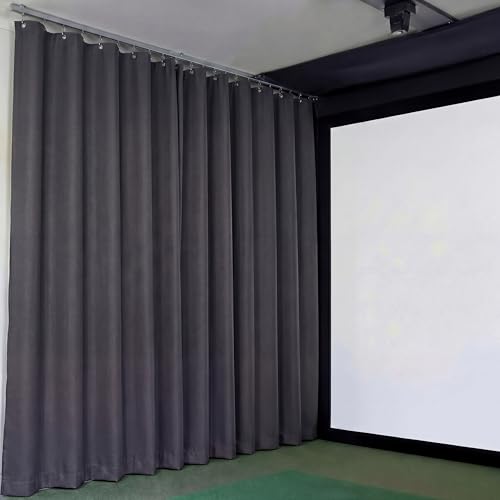
Best as a blackout accessory to improve image clarity in rooms with ambient light. This 12 x 10 ft curtain features blackout polyester to minimize reflections and noise, with grommets spaced along the top for easy hanging and quick setup. It helps maintain focus on the screen and can double as a wall padding option when used with a frame kit.
Who it’s for: buyers seeking enhanced visual contrast and a quieter practice space. Why chosen: effective light control improves perceived image quality during daytime sessions. Caution: this is curtain fabric, not a full enclosure; combine with a frame or nets for full protection and containment.
GYMMALL Golf Practice Net With Screen

Best for versatile training modes and flexible placement. This 10×8 ft setup combines a hitting net with an HD simulator screen and a target cloth, allowing three training modes: projection, central net practice, and target-based short game. It provides a fully enclosed area to prevent damage to walls and nearby objects during powerful swings.
Who it’s for: players who want a multi-functional training space that can adapt to different practice needs. Why chosen: the 3-in-1 design supports varying drill types and indoor versatility. Limitation: ensure projector compatibility and room lighting for a clear projection experience.
Buying Guide
- Space and layout: Measure width, depth, and ceiling height to ensure the enclosure and screen fit without crowding doors or furniture.
- Projector and screen compatibility: Check throw distance, brightness (ANSI lumens), and screen aspect ratio to match the enclosure dimensions.
- Launch monitor integration: If you want data-driven practice, consider a package that includes or supports a launch monitor with data capture and practice tooling.
- Durability and safety: Look for padded edges, sturdy steel frames, and protective nets to minimize rebound and wall damage.
- Assembly and flexibility: Tool-free assembly or included hardware can save time and effort. Consider whether you need removable side nets or adjustable screen heights.
- Light control: For daytime rooms, prioritize blackout curtains or high-durability screens to reduce ambient light impact.
- Budget and upgrades: Start with a core enclosure and screen and plan future upgrades (monitor, projector, or mat) as your space and budget allow.
FAQ
- What is the ideal room size for a home golf simulator? A room sized roughly 10×10 feet or larger is comfortable for most enclosures, screens, and mats, with enough clearance for swinging and projection.
- Do I need a dedicated projector for a golf simulator? Not always, but a short-throw projector helps minimize seating distance and space requirements in small rooms.
- Can I use any screen with a golf simulator enclosure? Most impact screens are designed to work with standard enclosures, but verify grommet spacing and mounting compatibility with your frame.
- Is a launch monitor essential for practice? A launch monitor provides data-driven feedback and can significantly improve training outcomes, but it is optional for basic projection-based practice.
- What maintenance is required for an enclosure and screen? Regularly inspect nets for wear, clean screens with soft cloth, and check padding for alignment to maintain safety and performance.
- Which product is best for beginners? A complete kit with enclosure, screen, and nets (like the KIKILIVE bundle) offers a straightforward setup and value for new users.