Answering the question “which home golf swing analyzer fits my space and goals?” this guide highlights five top options designed for indoor and outdoor use. Each model helps you capture swing data, visualize impact, and improve consistency without a full studio. The best pick depends on your needs: compact Doppler radar for real-time feedback, multi-metric monitors for detailed swing analysis, motion-sensing sims for immersive practice, or a portable system with high-quality video. The following selections suit practicing at home, in a garage, or on a covered patio, with varying space, data depth, and accessibility.
| Product | Best For | Key Benefit |
|---|---|---|
| Voice Caddie Portable Golf Launch Monitor | All-around training | Real-time feedback with Doppler radar and voice output |
| Golf Launch Monitor & Portable Swing Analyzer (13 Metrics) | Detailed metrics | Zero annual fees and multi-angle practice views |
| PHIGOLF Home Golf Simulator | Interactive play | Motion sensor swing tracking with 38,000+ courses |
| Garmin Approach R50 | Premium analytics | 3-camera system with high-speed impact videos |
| Rapsodo MLM | Accessible data | Shot-by-shot data with video replay and tracer |
Voice Caddie SC200Plus Swing Monitor

Best for budget-friendly real-time feedback. This model uses Doppler radar to collect data and features an LCD display with voice output for immediate results. It is suitable for players who want a compact, no-hassle training aid for indoor use as well as outdoor practice.
- All-new swing speed mode for tempo control without a ball
- Calibrated with atmospheric pressure sensors for reliable data
- Real-time feedback through voice output
Best for: casual players who want instant cues and straightforward data in a small setup. A potential limitation is the reliance on radar interpretation in tight spaces, which may require proper positioning for optimal readings.
13-Metric Golf Launch Monitor & Portable Swing Analyzer

Best for data depth and indoor/outdoor versatility. This device provides expanded metrics like attack angle and spin rate, with multi-angle practice views and smart alerts. It’s ideal for players who appreciate detailed swing insights and consistent data without ongoing fees.
- Zero annual fees with a one-time app download
- Built-in environmental sensors adjust data to real conditions
- Indoor space guidance and multi-angle views
Best for: players who want rich metrics and clear swing insights. Caution: indoor use requires sufficient space to capture accurate data (about 15 feet total with ball flight planning).
PHIGOLF Home Golf Simulator
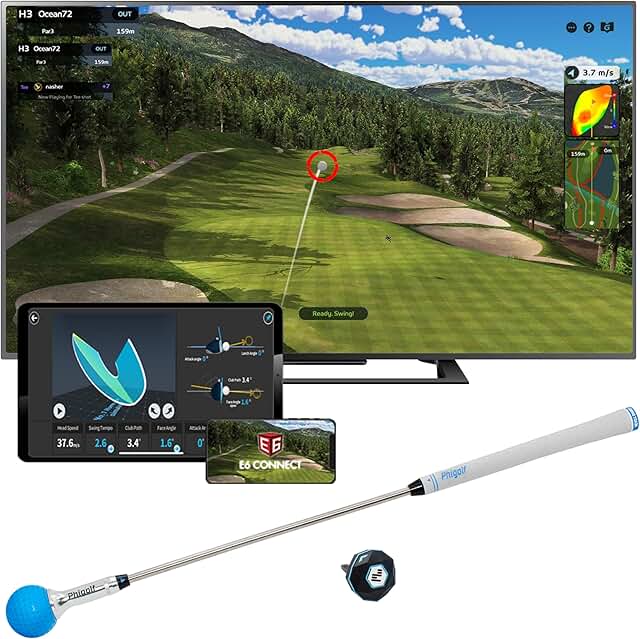
Best for interactive play and family-friendly practice. PHIGOLF combines motion tracking with a swing stick and access to thousands of courses. It supports both practice and leisure modes, making it suitable for households seeking a gamified practice experience.
- 9-axis motion sensor captures your swing movement
- Access to 38,000+ courses via app and E6 Connect
- Simple setup and play across skill levels
Best for: players who want an engaging, game-like experience. Limitation: the system relies on motion tracking rather than pure ball flight in some modes, which may affect certain data comparisons.
Garmin Approach R50 Premium Launch Monitor

Best for premium analytics with visual data. Garmin R50 uses a three-camera system to deliver precise metrics, impact videos, and a built-in 10-inch color touchscreen. It suits serious players who want an expansive data suite and on-device viewing capability.
- Three-camera system for precision measurements
- High-speed impact videos and an 10″ touchscreen
- Indoor and outdoor compatibility with selectable virtual rounds
Best for: golfers seeking advanced analytics and integrated video. Caution: subscription may be required for full virtual round features.
Rapsodo Mobile Launch Monitor

Best for portable data and quick feedback. The MLM offers shot-by-shot data with GPS-like view and video replay, making it easy to track improvements across sessions both indoors and outdoors.
- Shot-by-shot data with ball speed, carry, and launch angle
- Video replay with on-screen tracer to visualize ball flight
- Compact, easy to transport for range or backyard use
Best for: players who want a straightforward, portable analyzer with reliable tracking. Limitation: some features rely on device compatibility and may require a connected smartphone for full use.
Buying Guide: How to Choose a Home Golf Swing Analyzer
What should you look for in data depth?
Consider the number of metrics offered (ball speed, launch angle, spin, path, etc.). Higher metric counts help with granular swing improvements, but ensure you can interpret them easily.
Which sensors suit your space?
Radar-based monitors work well indoors with limited space, while camera-based systems benefit from larger rooms or backdrops. Motion-sensor setups add game-like engagement but may trade some raw precision for playability.
Are there ongoing costs?
Some models have zero annual fees and rely on a one-time app download, while others require subscriptions for add-on features or virtual rounds. Decide if you want a turnkey solution or a scalable platform.
How important is portability?
Portability matters for travel, shared spaces, or a small apartment. Compact devices with easy setup are ideal for quick sessions, while larger simulators suit dedicated practice rooms.
Do you need video and playback?
Video replay and shot tracing help diagnose swing faults quickly. If visual feedback is essential, prioritize devices that provide clear playback alongside numeric data.
FAQ
-
What is a home golf swing analyzer?
A device that measures and reports swing data such as speed, angle, spin, and impact to help you improve practice outside the golf course.
-
Do these devices require subscriptions?
Some do; many offer free basic functionality with optional paid features or virtual rounds. Check each model for exact terms.
-
Can I use these indoors?
Yes. Most models support indoor use with or without a ball. Ensure you have adequate space as recommended by the product guide.
-
Which model is best for beginners?
Entry-level options with real-time feedback and simple interfaces are best for beginners, such as radar-based monitors with voice cues or basic mobile launch monitors.
-
Which data metric matters most for improvement?
Launch angle, ball speed, and face-to-path are common core metrics. Spin rate and attack angle are also valuable for refining shot shaping and consistency.