If you’re looking to practice serious golf from home, a dedicated golf simulator setup offers the most realistic swing feedback, ball-flight visuals, and year-round play. This guide highlights five proven home-use options, from motion-sensor experiences to full enclosure systems, each chosen for different living spaces and budgets. Ideal buyers include: space-conscious beginners, avid players seeking practice consistency, and home enthusiasts wanting a semi-pro practice area. The table below compares key features to help you decide quickly.
| Product | Best For | Setup Ease | Key Benefit |
|---|---|---|---|
| PHIGOLF Home Golf Simulator | Casual to intermediate players | Easy | Motion-sensor swing tracking with 38,000+ courses |
| Complete Golf Simulator Enclosure Package | Dedicated practice space | Moderate | 4K-ready screen with blackout cage |
| Golf Net, 10x7FT | Budget-friendly practice | Easy | Targets and durable construction |
| 2 in 1 Golf Simulator Net System | Versatile indoors/outdoors | Moderate | 4K-ready impact screen for projector use |
| Golf Simulator Enclosure Kit | Premium home setup | Moderate | HD impact screen with safety padding |
PHIGOLF Home Golf Simulator with Motion Sensor

Best for players seeking an integrated motion-sensor experience without a large enclosure. The PHIGOLF system uses a 9-axis motion sensor and a premium swing stick to translate real-world movement into the game, with access to 38,000+ courses via Phigolf and E6 Connect. It is designed for straightforward setup and play across skill levels, making it ideal for family use and casual practice at home.
- Motion-tracked swing play enhances practice feedback compared to basic nets.
- Compatible with Android and iOS through the Phigolf app, enabling flexible play locations.
- Better for: compact spaces where a full enclosure is not feasible.
Limitation: Requires compatible devices and may rely on external screens or projectors for full course visuals.
Complete Golf Simulator Enclosure Package

Best for serious at-home practice spaces. This all-in-one enclosure offers a durable, safe setup with a projector-ready configuration and a complete frame system. It suits dedicated golfers who want a professional-looking cocoon for year-round practice, with easy assembly compared to custom builds.
- Includes a projector mount and all frame poles for a turnkey setup.
- Designed for safe practice with a sturdy enclosure and clean visuals.
- Better for: dedicated spaces that can host a full sim environment.
Caution: Turf and projector are typically not included, so plan for compatible accessories separately.
Golf Net, 10x7FT With Practice Mat

Best for entry-level and hobbyist golfers on a budget. The 10×7 ft practice net features a central bullseye target and multiple pockets to focus on driving, pitching, chipping, and putting. It’s highly portable and includes a turf mat and balls, making it ideal for flexible indoor/outdoor setups.
- Durable materials support high-intensity practice.
- Various targets help refine multiple strokes, from drive to pitch.
- Limitations: Not a full simulator; misses the flight data and visuals of a projector-based system.
2 in 1 Golf Simulator Net System

Best for flexible training spaces that adapt from everyday practice to projector-based simulation. This 10×8 ft net system can function as a standard net for daily chipping and driving or switch to a 4K-ready impact screen for simulator projection. It provides a sturdy frame and a padded build for controlled rebounds.
- 2-in-1 design supports immediate transition from practice nets to simulated sessions.
- Impact screen offers crisper visuals and lower ball rebound for a better feel.
- Choose this if you want a future-proof setup that scales with your home gym.
Golf Simulator Enclosure Kit With Premium HD Screen
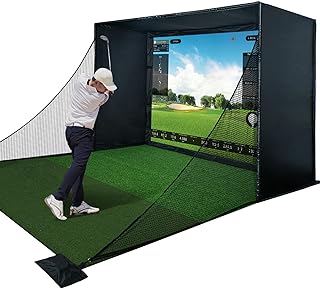
Best for premium home setups focusing on safety and high-quality visuals. This enclosure kit includes a robust steel frame, full safety padding, and a triple-layer commercial-grade impact screen. It emphasizes reduced rebound, quiet practice, and HD projection for a more immersive experience.
- Triple-layer screen delivers crisper HD visuals and better durability.
- Full safety padding reduces ricochets by over 50%, enhancing training confidence.
- Limitations: Setup is more involved; best suited for dedicated practice spaces.
Buying Guide
What should you consider when choosing a golf simulator setup for home use?
- Space and layout: Do you have a dedicated room, garage, or living area suitable for an enclosure, or do you need a net-based option?
- Simulation quality: Are you seeking real-course visuals via projector, or is swing analysis and feedback the priority?
- Ease of setup: Do you prefer plug-and-play systems or are you comfortable assembling frames and screens?
- Safety features: Is rebound control and padding important for your training environment?
- Expandability: Will you want to upgrade to 4K projection or advanced tracking in the future?
FAQ
- What is the simplest way to start a golf simulator at home?
Choose a compact enclosure or net system with built-in swing feedback to minimize setup time. - Do you need a projector for realistic simulator visuals?
Not always; some systems use mobile devices or flat-screen displays, but projectors provide the most immersive experience. - Is a larger enclosure always better for practice?
Not necessarily; it depends on space, how much room you have for backswing, and how you plan to use the setup. - Are motion-sensor systems as effective as 4K screen setups?
Motion sensors improve swing feedback and training consistency, while 4K screens enhance visual realism. - What maintenance is required for home golf simulators?
Regularly check nets, padding, and mounting hardware; clean screens and projector surfaces, and replace worn turf as needed. - Can these systems help beginners improve quickly?
Yes, through immediate feedback, repeatable practice layouts, and guided drills.