Answering the demand for accurate, convenient swing feedback at home, these at-home golf launch monitors help players track key metrics such as club head speed, ball speed, launch angle, and spin. Ideal for goal-minded golfers who train indoors or on the range, each option offers different strengths—from precise data capture to immersive practice experiences. The list below highlights five monitors that balance portability, data depth, and value, with quick notes on who each is best for and potential limitations.
| Product | Best For | Key Benefit | Limitation |
|---|---|---|---|
| Garmin Approach R10 | All-around training at home | Comprehensive metrics via Garmin Golf app | Requires compatible smartphone for full data |
| Shot Scope LM1 Portable Mini | Real-time speed and distance focus | Advanced ball & club speed tracking | Data depth depends on sensor setup |
| Square Golf Indoor Home Launch Monitor | Detailed analytics and virtual practice | High-speed camera and machine vision data | Pre-owned unit availability varies |
| FlightScope Mevo Power Bundle | Real-time swing data on the go | Carry distance, spin, and velocity metrics | Power bundle adds cost and accessories |
| Shot Scope LM1 PlayBetter Power Bundle | Indoor and outdoor versatility | Color screen and extended battery | Bundle visuals may vary by retailer |
Garmin Approach R10: Portable Golf Launch Monitor

- Brands: Garmin
- Battery Life: Up to 10 hours
- Accessory use: Tracks metrics when paired with Garmin Golf app
The Garmin Approach R10 is best for players who want a compact, all-around launch monitor that integrates with a trusted app ecosystem. It measures club head speed, ball speed, launch angle, and direction with precision, and offers training mode with shot dispersion charts. This monitor is well-suited for golfers who train at home or on the range and prefer data that ties directly into a long-standing golf app platform. Caution: full data depth hinges on smartphone pairing and active app use; data can be less accessible without connectivity.
Shot Scope LM1 Portable Mini Launch Monitor
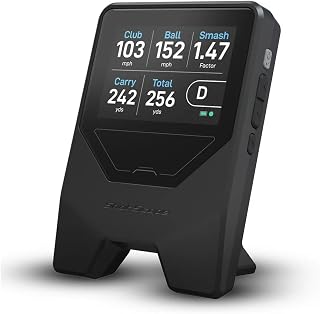
- Brand: Shot Scope Technologies
- Key Features: Advanced ball & club speed tracking, real-time smash factor, distance data
Designed for players who want direct, fast feedback on swing and ball metrics, the Shot Scope LM1 Mini is “best for” golfers who value real-time speed and distance data on the practice mat. It emphasizes speed and smash factor to quantify impact quality. Choose this if you want quick, actionable stats during sessions. Limitation: data depth may depend on sensor placement and the chosen data view within the app or device.
Square Golf Indoor Home Launch Monitor & Simulator (Pre-Owned)

- Brand: PlayBetter
- Key Features: High-speed camera, machine vision for ball and club data, virtual golf courses
Best for players who want an immersive practice experience alongside data capture. The Square Golf system emphasizes camera-based analytics, tracking both ball and club metrics, and offers virtual play. It is a strong pick for those who enjoy real-time feedback with a virtual course environment. Caution: availability as a pre-owned unit may affect warranty or condition; verify hardware integrity before purchase.
FlightScope Mevo Portable Launch Monitor + Power Bundle

- Real-time swing data, including carry distance and spin
- Vertical launch and smash factor metrics
Best for players who want a portable solution with comprehensive swing data on the go. The Mevo bundle provides immediate carry and spin insights, helpful for dialing in ball flight. Choose this if you value mobile data depth; beware that bundled accessories may vary by seller and can affect total value.
Shot Scope LM1 PlayBetter Power Bundle

- Colorful 3.5″ screen
- 5-hour battery life
- Indoor and outdoor use
Best for players who want a versatile, portable unit with a user-friendly display and extended battery life. The LM1 PlayBetter Power Bundle suits those who train in multiple spaces and want reliable, on-device feedback. Consider potential variability in data depth if sensors are misaligned or settings are not optimized for the environment.
Buying Guide
Key considerations for selecting an at-home launch monitor:
- Data depth vs. ease of use: Do you want rich analytics (spin, swing path, attack angle) or quick feedback (speed, distance, smash factor) for practice sessions?
- Indoor space and lighting: Camera-based systems need good lighting and stable placements; radar-based options may be more forgiving.
- Power and portability: Battery life matters for long sessions; consider whether you train at a fixed space or move around.
- App ecosystem and data export: A platform with robust app analytics helps track progress over time and compare sessions.
- Upgrade path and compatibility: Some models pair with specific apps; ensure compatibility with your smartphone or tablet.
Frequently Asked Questions
- What is the most accurate at-home launch monitor?
– Accuracy depends on the metric; camera-based systems often excel in ball and club data, while radar-based units may perform well in varied lighting and spaces. Check the manufacturer’s data for your target metrics. - Do I need a subscription for analysis?
– Many monitors offer built-in analyses, with some requiring optional app subscriptions for advanced features. Review what is included with the package and any ongoing costs. - Can these monitors be used outdoors?
– Most models support indoor and outdoor use, but lighting, weather, and surface conditions can affect data capture. Indoor consistency is typically easier to maintain. - Will these monitors work with any smartphone?
– Some require specific apps or device compatibility. Confirm supported devices and OS versions before purchasing. - Are pre-owned monitors a good option?
– Pre-owned units can be cost-effective but may vary in data reliability or warranty. Inspect condition and verify return policies with the seller.