If you’re searching for the best video camera for golf, these picks excel at capturing fast swing action, clear ball tracking, and convenient setup. Ideal buyers include coaches analyzing swings, amateur players practicing at home, and content creators documenting golf tutorials. The top five options vary from compact action cams to high-resolution USB cameras designed for computer capture. Below, see a quick summary of the best choices and who they’re best for, followed by detailed sections for each product and a practical buying guide.
Quick reference: chosen products at a glance
| Product | Best For | Key Benefit |
|---|---|---|
| SVPRO USB Camera 1080P 120fps | Swing Analysis At Home or Studio | High-speed 120fps at 1080p for smooth motion |
| AKASO EK7000 4K30Fps | Outdoor Golf Sessions | 4K video with waterproof design |
| ZYDIIE 4K Camcorder | Vloggers And Travel Golf | 4K with 64MP photos, 18x zoom |
| XbotGo Falcon All-in-One 4K | Team Practice And Games | AI auto-tracking with dual-lens 4K |
| 5K Video Camera Camcorder (Uytya) | Content Creation And Tutorials | 5K/4K modes, extensive creator bundle |
SVPRO USB Camera 1080P 120fps High Speed Camera For Golf Swing

The SVPRO USB Camera is designed for precise golf swing analysis with high-speed performance. Best for players and coaches who need fluid motion capture for break points and club path studies. Features include programmable frame rates up to 120fps at 1080p and a 12MP still image sensor for detailed documentation of swings. The 3.6-10mm manual zoom lens lets you adjust framing without moving the camera, facilitating versatile shot setups. A caution: the camera relies on USB capture, so ensure your software supports UVC input for best results.
Best for: players and coaches who want clear slow-motion swing footage in a compact, plug-and-play package. Why selected: 120fps at 1080p delivers smooth motion capture crucial for analyzing fast golf actions, while the 3X manual optical zoom provides flexibility for different distances.
AKASO EK7000 4K30FPS Action Camera

The AKASO EK7000 offers versatile outdoor recording with true 4K30Fps video and 20MP stills, making it suitable for practice rounds on the course or a seaside range session. Best for: golfers who want an all-weather option with waterproof resilience and wireless capabilities for on-the-fly shot reviews. Why selected: 4K video and EIS stabilization help maintain stable footage during dynamic outdoor play, while waterproofing expands use beyond dry conditions. Caution: wireless features can be less reliable in dense environments or crowded areas.
ZYDIIE 4K Video Camera Camcorder
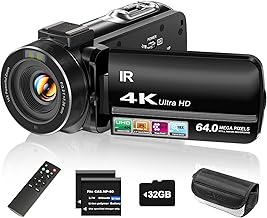
The ZYDIIE camcorder blends 4K recording with a 64MP photo capability, appealing to golfers who want high-resolution captures for swing stills and play-by-play analysis. Best for: travel golfers and content creators who need a single device for quick vlogs and course footage. Why selected: 4K video with 64MP photos offers enhanced detail for slow-motion breakdowns and shot-by-shot comparisons. Limitation: the 3″ screen and compact form factor may require additional accessories for steady on-course use.
XbotGo Falcon All-in-One 4K Action Camera

The XbotGo Falcon is an all-in-one AI sports camera designed for hands-free game recording. Best for: team practices and game analysis where automatic tracking helps capture the action without a dedicated operator. Why selected: AI auto-tracking keeps focus on the primary action, while the dual-lens 4K recording supports both wide and close-up perspectives. Caution: dual-lens features may increase data management needs and require more storage and processing power during editing.
5K Video Camera Camcorder (Uytya)

The Uytya 5K camcorder targets creators who want cinematic footage combined with practical golf content creation features. Best for: YouTubers and online instructors needing high-resolution video and a robust creator bundle. Why selected: 5K/4K modes offer cinematic options, a rotatable touchscreen, and an included kit that eases production setup. Limitation: higher resolution footage demands more storage and processing during editing; verify your computer’s capabilities before long shoots.
Buying Guide
What to consider when choosing a golf video camera
- Intended use: swing analysis, outdoor practice, or on-course filming. Choose a model with the right balance of frame rates, stabilization, and durability for your typical environment.
- Resolution and frame rate: higher frame rates (120fps) help analyze fast swings, while 4K or 5K resolution provides crisp details for post-analysis and tutorials.
- Lens and zoom: optical zoom (not digital) preserves image clarity when framing distant actions. Manual zoom on some models allows precise composition without repositioning.
- Stabilization: electronic or optical stabilization reduces blur during dynamic golf motions. Consider models with EIS for handheld shooting.
- Portability and setup: compact cameras with easy mounting are ideal for practice bays and short-range on-course use. Check power options and battery life.
- Storage and compatibility: ensure your device supports your preferred ports and has sufficient onboard storage or external options for long sessions.
Who Should Buy Each Type
- High-speed USB cameras: best for home studios and swing clinics where smooth slow-motion review is essential.
- Action cameras: great for outdoor sessions, weather resistance, and quick setup on the range.
- Camcorders with high megapixel sensors: ideal for creators needing both video clarity and high-resolution stills for analysis notes.
- AI sports cameras: excellent for team practices and games where hands-free recording and smart tracking save time.
- Creator bundles with 5K/4K modes: suited for serious content creators who publish tutorials and match-day coverage.
FAQ
- What frame rate is best for golf swing analysis? – Look for cameras that offer 120fps at 1080p or higher for smooth motion review.
- Do I need 4K to analyze a swing? – Not strictly, but higher resolution helps when zooming in on small details during post-analysis.
- Is stabilization important for on-course recording? – Yes, especially if you shoot handheld or without a tripod to minimize motion blur.
- Should I choose a camera with a zoom lens? – A 3X optical zoom helps frame shots from different distances without repositioning, which is useful on a range.
- What accessory is most helpful for golf filming? – A stable mount or small tripod, plus a protective case for outdoor use and weather conditions.
- Can I use these cameras with my computer for analysis? – Many USB cameras support UVC plug-and-play on Windows, MacOS, and Linux; verify compatibility with your software.