Answering the search: If you want a reliable projector mount for a golf simulator, opt for mounts that offer sturdy construction, adjustable height, and flexible positioning to align with your hitting area. The top picks below are selected for different setups—ceiling, wall, or floor-ready installations—so you can choose what fits your space, ceiling type, and projector model. Best for home simulators, offices, and garages where stable image alignment matters.
| Product | Best For | Why It Stands Out |
|---|---|---|
| JOY worker Universal Projector Ceiling Mount | Ceiling or wall installations; adjustable length | Three-in-one mount with extendable arms up to 25.2″ for flexible placement and low-profile design. |
| DYNAVISTA Full Motion Universal Ceiling Mount | Full motion, ceiling setups | Wide tilt/swivel/rotation with 43.6″ extension, supports most brands, robust steel build. |
| WALI PM-003-W Ceiling/Wall Mount | Versatile ceiling or wall mounting; heavier projectors | Supports up to 44 lbs, adjustable pole length, compact low-profile design. |
| PUTORSEN Adjustable Projector Ceiling Mount | No-hole installation and hidden cabling | Tray holds up to 22 lbs, extendable arm for precise placement, no ceiling drilling required. |
| SCREEN PRO Projector Mount | Universal, long-throw flexibility | 55″ to 79″ height range, extendable arms, 22 lb max weight with full motion. |
JOY worker Universal Projector Ceiling Mount

Best for flexible installation: This 3-in-1 mount supports flush ceiling, telescoping arm ceiling, and wall mounting. Its height-adjustable arm ranges from 5.5″ to 25.2″, allowing precise projector alignment for even floor-to-ceiling throws typical in golf simulators. Suitable for projectors up to 33 lbs, making it a versatile choice for compact home setups. Consider this if you want one mount that adapts to multiple room layouts. Note: Ensure your ceiling is capable of supporting the bracket in extended configurations.
DYNAVISTA Full Motion Universal Ceiling Mount
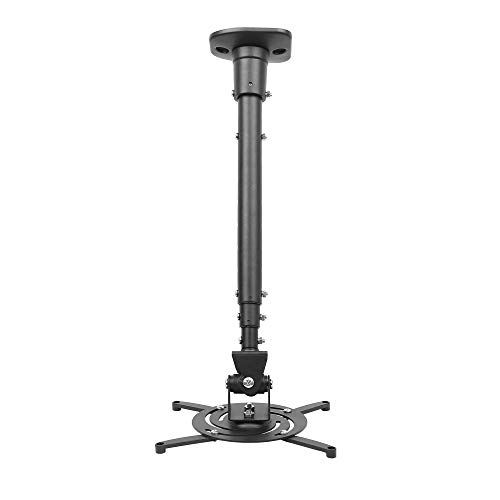
Best for wide motion ranges: This full-motion ceiling mount tilts 25 degrees, swivels 90 degrees, and rotates 360 degrees. It extends up to 43.6 inches and collapses to about 23 inches, enabling flexible alignment for golf simulators that require precise projector placement relative to the hitting area. Best for larger rooms or setups needing dynamic viewing angles. Caution: Check compatibility with your projector’s mounting hole pattern and weight (max 30 lbs).
WALI Projector Mount PM-003-W

Best for heavier projectors and mixed installations: The WALI PM-003-W supports up to 44 lbs, with a 16.9″–25.6″ ceiling pole (and 13.8″–22″ for wall), plus tilt and swivel. This makes it a solid choice when you need strong support and flexible positioning without a bulky profile. Best for dedicated golf simulator rooms where stable, high-load mounts are required. Limitation: Not ideal for vaulted ceilings or drywall-only ceilings without proper support.
PUTORSEN Adjustable Projector Ceiling Mount

Best for no-hole installations and easy cable routing: The PUTORSEN mount features a hidden-cable design and a 14.17″–21.65″ adjustable arm, supporting up to 22 lbs. It’s ideal when you want a clean ceiling setup without drilling, or when you need to move a projector between a ceiling and a wall. Consider this if your space requires frequent reconfiguration or renter-friendly installation. Limitation: Weight limit is 22 lbs, so verify your projector’s weight before purchasing.
SCREEN PRO Projector Mount

Best for universal fit and long-throw setups: The SCREEN PRO ceiling mount fits many mainstream projectors with arm extensions from 55″ to 79″ and a 22 lb weight limit. It offers 30° tilt, 10° swivel, and 360° rotation for versatile viewing angles. Use this when your golf simulator space requires substantial height adjustability and precise angle control. Caution: Ensure your ceiling structure supports the extended arm length and load.
Buying Guide: How to Choose the Right Golf Simulator Projector Mount
- Weight capacity: Match the projector’s weight to the mount’s maximum. A higher load rating improves stability and reduces drift during swing analysis.
- Mount type: Ceiling mounts save space; wall mounts can be easier to adjust after installation. Floor-mounted enclosures, like dedicated golf projector cases, offer protective advantages but require floor space.
- Adjustability: Consider tilt, swivel, and extension range. Longer arms help if your projector sits away from the screen or in rooms with limited ceiling height.
- Installation considerations: Check ceiling type, joist placement, and whether you prefer no-drill (no-hole) installations. Hidden cable routing helps keep the setup clean and reduces snag hazards.
- Compatibility: Verify hole pattern (the distance between mounting holes) and VESA compatibility with each projector. Some mounts specify universal compatibility; confirm with your model.
- Durability: Look for steel construction and corrosion resistance for long-term use in a high-traffic golf simulator room.
Frequently Asked Questions
- What is the best mount for a tight golf simulator room?
– A low-profile ceiling mount with extendable arms and hidden cabling, like a 3-in-1 mount, maximizes space without obstructing the hitting area. - Can I mount a projector on the wall instead of the ceiling?
– Yes; many 3-in-1 mounts support both ceiling and wall installation, but verify weight and hole patterns before mounting. - How far should the projector be from the screen?
– This depends on the projector’s throw ratio; adjust the mount’s arm or extension to align the image with the golf screen for accurate simulations. - Is a no-hole installation effective for golf simulators?
– No-hole mounts offer easy setup and cable routing, but ensure the ceiling can safely support the added weight and mounting points. - Do I need a special enclosure for a projector in a golf room?
– Enclosures protect the projector from accidental impacts and dust but add cost and space requirements. Choose based on room activity and risk of ball strikes. - How do I prevent projection drift during swings?
– Secure mounting, level alignment, and ensuring the projector is properly aligned with the screen reduce drift. Recheck after moving furniture or equipment.